Stop watching.
Start coding quantum.
Write real Python/Qiskit, watch your circuit live, get hints from an AI tutor. Runs entirely in your browser.
No credit card required · Free Track 1 forever
from qiskit import QuantumCircuit

qc = QuantumCircuit(1, 1)
qc.measure(0, 0)

counts = simulate(qc, shots=1024)
print_counts(counts)
Run this for real in the playground
Live simulation. No signup, no install.
You can read about quantum computing for a year and still not be able to write a circuit
Quantum computing has more explainer content than almost any field its size. Videos, analogies, popular science books. Most of it stops exactly where the difficulty starts, which is the moment you have to produce a circuit yourself.
The gap is not conceptual. It is that superposition, phase, and entanglement do not become real until you have written code that gets them wrong, seen the state vector disagree with you, and fixed it.
myqubit is built around that loop. Every lesson is code you write and run, with the quantum state rendered next to it while you work.
Learn by building, not watching
Every lesson opens an editor, not a video. You write real Python with Qiskit-compatible syntax, run it, and read the output the way you would in a notebook. A drag-and-drop gate builder teaches you an interface. This teaches you the language IBM Quantum actually takes.
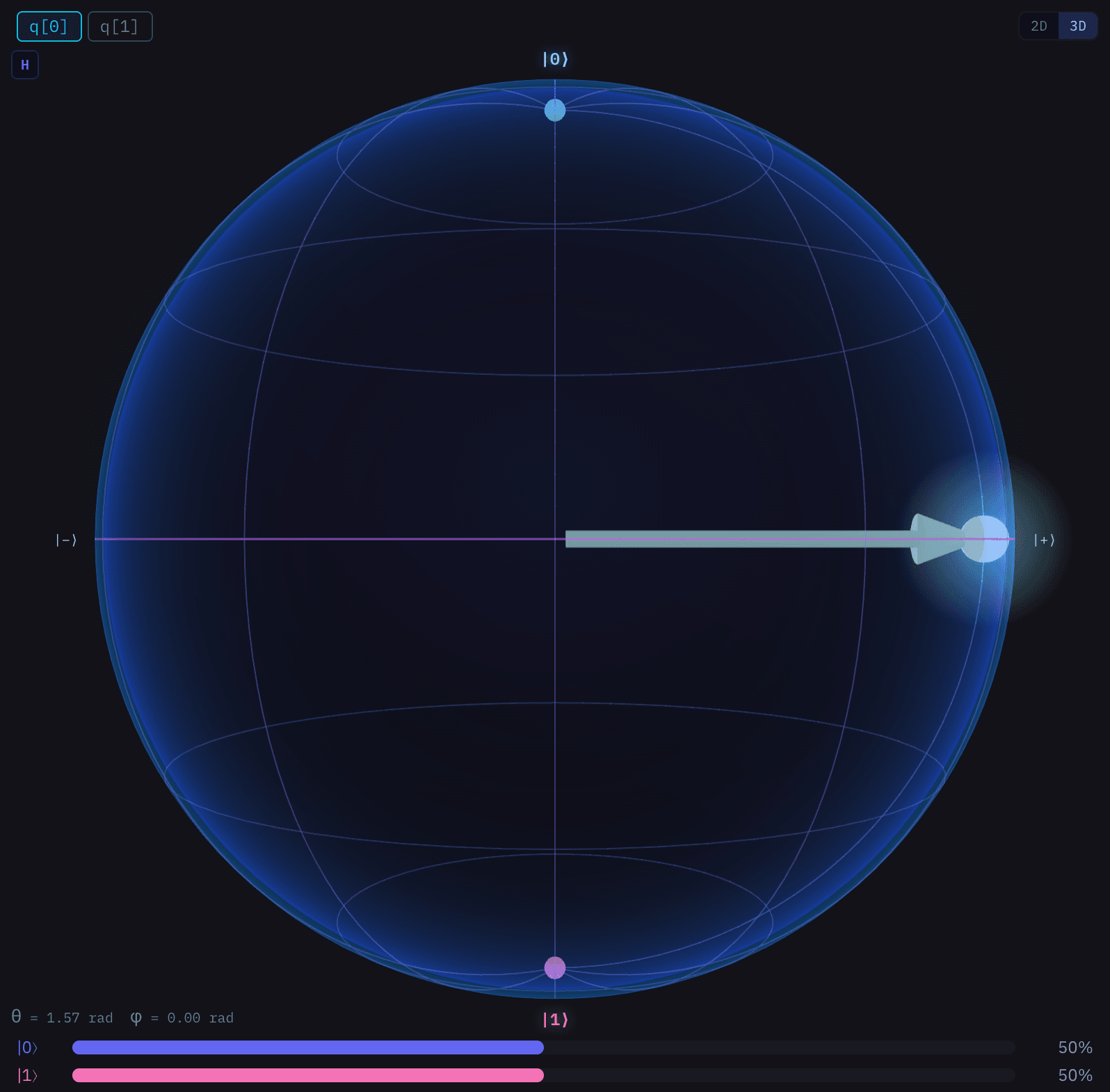
Five visualizations sit beside the editor: Bloch sphere, state vector, circuit diagram, histogram and phase chart. They redraw from your own run, so a misplaced gate stops being an abstract mistake and becomes a vector pointing somewhere you did not intend.
When you stall, Qubitus, the built-in tutor running on Claude, answers with a hint rather than the solution, so the next attempt is yours. Anything you build in the playground shares as a link, and whoever you send it to can run it without an account.
From zero to quantum circuit in minutes
There is nothing to install and no environment to configure. The editor, the Python runtime and the visualizations all run in the browser, so the gap between deciding to try quantum computing and having a circuit on screen is one page load.
Pyodide is CPython compiled to WebAssembly, which means the code you write here is the code you would write locally, not a simplified dialect of it. The same three stages repeat in every lesson, so the loop is learned once.
Write Python
Qiskit-compatible syntax in the browser editor. No install, no environment to set up.
Run it
Pyodide executes the file through WebAssembly, inside the tab you already have open.
See what it did
Bloch sphere, state vector, circuit diagram and histogram redraw the moment the run finishes.
Step through circuits like a debugger
Run a circuit and you get a final answer. Step it and you get the reasoning: the Bloch sphere redraws after each gate, one gate at a time, and the editor line that produced it highlights as you move.
Go forward, go back, or jump to either end of the circuit. When a Bell pair comes out wrong, this is where you find out which gate did it, instead of rereading the whole file.
qc.h(0)|+⟩ superpositionqc.cx(0, 1)Bell state (|00⟩+|11⟩)/√2qc.measure_all()Collapsed to |00⟩ or |11⟩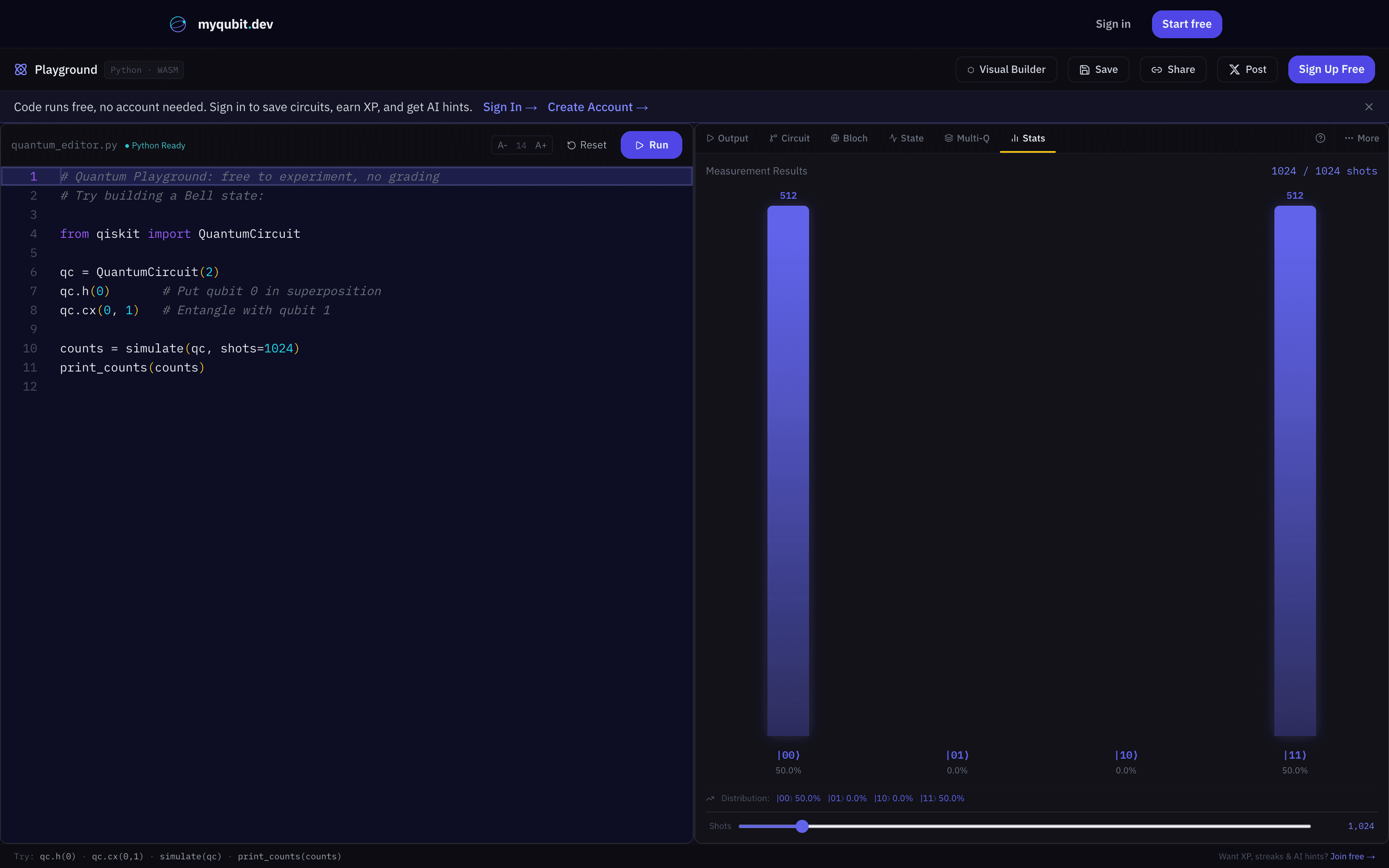
A real run. Not a mockup.
What you'll actually build
Every lesson ends with working code you ran yourself, not a concept you memorized. Three real lessons, each with the output the platform prints.
- Runs in-browser, no install
- 5 live visualizations
- Real Qiskit Python
- AI tutor, not AI content
- Certificate on completion
- BeginnerTrack 1 · Lesson 4
Bell state: two entangled qubits
Your first quantum circuit. One Hadamard, one CNOT, and two qubits that never disagree.
qc = QuantumCircuit(2, 2)
qc.h(0)                      # superposition
qc.cx(0, 1)                  # entangle
qc.measure([0, 1], [0, 1])
print_counts(simulate(qc, shots=1024))
Output
Measurement Results:
-----------------------------------
  |00⟩:  503 ( 49.1%) ████████████████
  |11⟩:  521 ( 50.9%) ████████████████
  Total shots: 1024
- IntermediateTrack 4 · Lesson 3
Grover's search over four items
An oracle marks the answer, a diffuser amplifies it. Over four items a single iteration is exact.
qc = QuantumCircuit(2, 2)
qc.h(0); qc.h(1)             # uniform superposition
qc.cz(0, 1)                  # oracle marks |11>
qc.h(0); qc.h(1)             # diffuser
qc.z(0); qc.z(1)
qc.cz(0, 1)
qc.h(0); qc.h(1)
qc.measure([0, 1], [0, 1])
print_counts(simulate(qc, shots=1024))
Output
Measurement Results:
-----------------------------------
  |11⟩: 1024 (100.0%) █████████████████████████████████
  Total shots: 1024
- AdvancedTrack 6 · Lesson 7
Variational ansatz for VQE
Rotation angles are now parameters. Move theta and the whole distribution moves with it, which is what an optimizer trains.
import math
theta = [math.pi / 3, math.pi / 4]

qc = QuantumCircuit(2, 2)
qc.ry(theta[0], 0)
qc.ry(theta[1], 1)
qc.cx(0, 1)                  # entangling layer
qc.measure([0, 1], [0, 1])
print_counts(simulate(qc, shots=1024))
Output
Measurement Results:
-----------------------------------
  |00⟩:  651 ( 63.6%) █████████████████████
  |01⟩:   41 (  4.0%) █
  |10⟩:  108 ( 10.5%) ███
  |11⟩:  224 ( 21.9%) ███████
  Total shots: 1024
Quantum coding, gamified
Every lesson you finish pays XP, and enough XP moves you a level. Quantum-themed titles mark the milestones as you climb, from Bit Flipper at the start to Quantum Master at the top.
Streaks count the days you kept coming back, and more than twenty achievements mark the milestones worth hitting, from a first working circuit to a finished track. None of it is decoration on top of a video course. The XP comes from code you ran.
This week
The leaderboard counts XP earned since Monday, so everyone starts the week level with everyone else.
Resets every Monday. Join to compete
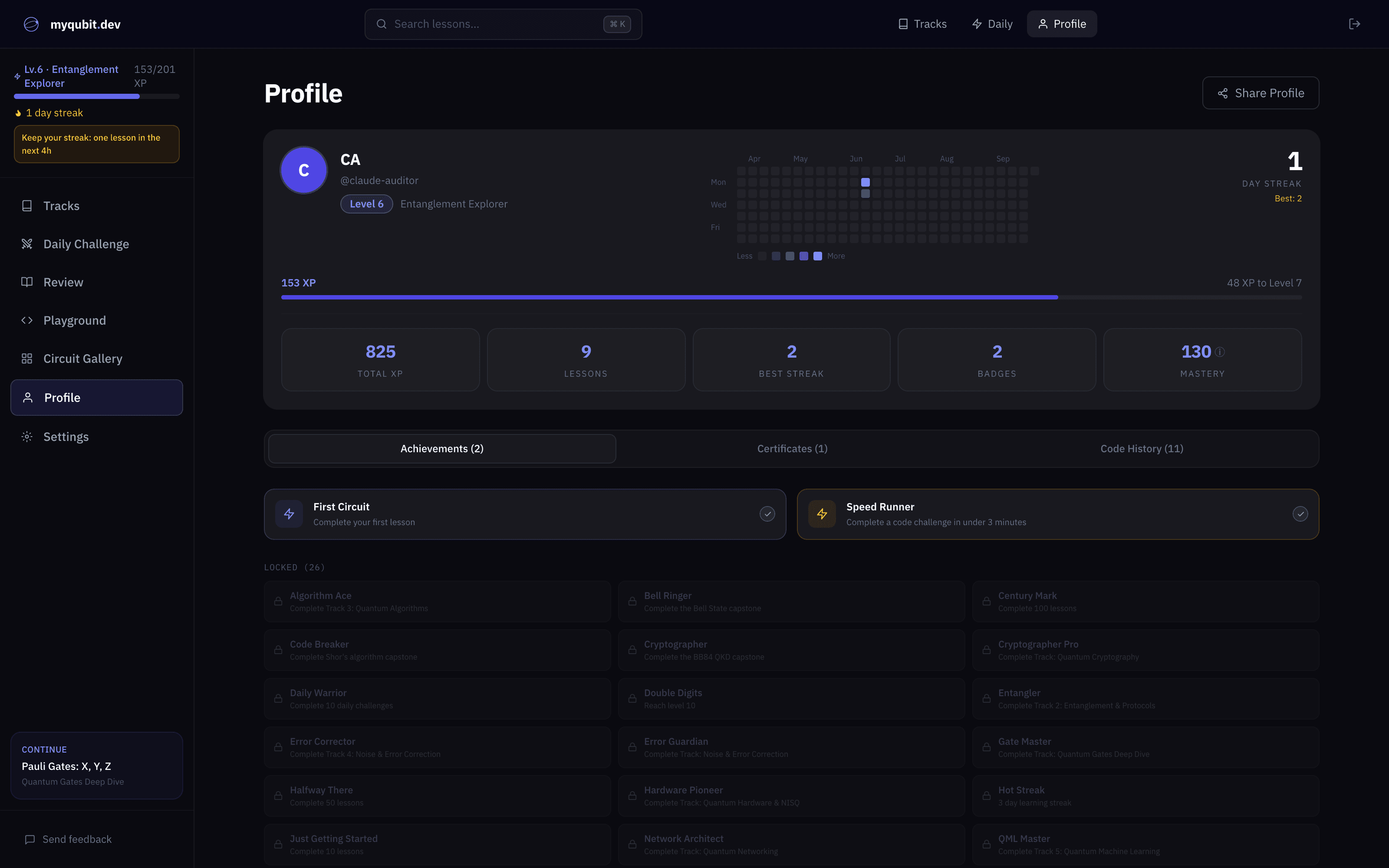
A real myqubit account we run, not an average or a typical result.
Every lesson, listed
160 lessons across 10 tracks. Open any track to read the full lesson list before you sign up.
Open the full curriculum pageQubits, gates, superposition, measurement, and your first entangled state.
01Quantum FoundationsLearn the basics: qubits, gates, superposition, and measurement.17 lessonsFree
- 1Classical vs QuantumReading+50
- 2Your First QubitCode challenge+100
- 3The Pauli-X (NOT) GateCode challenge+100
- 4Superposition & the Hadamard GateCode challenge+100
- 5Combining GatesCode challenge+125
- 6Phase Gates: Z, S, and TReading+75
- 7Measurement BasesReading+75
- 8Measuring in Different BasesCode challenge+125
- 9The Bloch Sphere: A Map of the QubitReading+75
- 10Rotation MatricesReading+75
- 11Rotation Gate ChallengeCode challenge+150
- 12Quantum Measurement TheoryReading+75
- 13Multi-Qubit CircuitsReading+75
- 14Tensor Products: The Math of Multiple QubitsReading+75
- 15The CNOT GateCode challenge+125
- 16Creating EntanglementCode challenge+150
- 17Bell State CapstoneProject+250
02Quantum Gates Deep DiveMaster single-qubit and multi-qubit gates. Understand rotations, phases, and the math behind every gate in Qiskit.12 lessonsPro
- 1The Bloch SphereReading+75
- 2Pauli Gates: X, Y, ZCode challenge+100
- 3Hadamard Gate & SuperpositionCode challenge+125
- 4Rotation Gates: Rx, Ry, RzCode challenge+125
- 5Phase Gates: S, T, and RzReading+75
- 6CNOT Gate & EntanglementCode challenge+150
- 7Gate Identities & OptimizationReading+75
- 8Gate DecompositionsReading+75
- 9Gate SynthesisCode challenge+150
- 10Universal Gate SetsReading+75
- 11The Clifford+T Gate SetCode challenge+175
- 12Gates Capstone, 3-Qubit GHZ StateCode challenge+200
03Entanglement & ProtocolsMaster multi-qubit systems, quantum teleportation, and cryptographic protocols.11 lessonsPro
- 1Bell States Deep DiveCode challenge+100
- 2Density Matrices and Mixed StatesReading+75
- 3The No-Cloning TheoremReading+75
- 4Superdense CodingCode challenge+125
- 5Quantum TeleportationCode challenge+150
- 6Entanglement SwappingCode challenge+175
- 7GHZ StatesCode challenge+125
- 8BB84 Quantum Key DistributionReading+100
- 9BB84 Protocol CapstoneProject+250
- 10Distributed EntanglementReading+75
- 11Quantum RepeatersReading+75
Algorithms, real hardware, noise, error correction, and quantum machine learning.
04Quantum AlgorithmsLearn the algorithms that make quantum computers powerful.12 lessonsPro
- 1Quantum InterferenceReading+75
- 2Deutsch-Jozsa AlgorithmCode challenge+125
- 3Grover's Search AlgorithmCode challenge+150
- 4Amplitude AmplificationCode challenge+175
- 5Quantum WalksCode challenge+150
- 6Quantum Fourier TransformCode challenge+150
- 7Quantum Phase EstimationReading+100
- 8Shor's Algorithm OverviewReading+100
- 9Shor's Algorithm CapstoneProject+300
- 10The HHL AlgorithmReading+75
- 11Variational Eigensolver BasicsCode challenge+200
- 12QAOA Circuit DepthReading+75
05Quantum Hardware & NISQExplore the physics of real quantum computers, understand noise, and learn near-term algorithms designed for today's noisy hardware.20 lessonsPro
- 1How Quantum Computers Are BuiltReading+75
- 2Superconducting Qubits & Josephson JunctionsReading+75
- 3Simulating T1 DecayCode challenge+125
- 4Trapped Ion Quantum ComputersReading+75
- 5Photonic Quantum ComputingReading+75
- 6Hardware-Native GatesReading+75
- 7Circuit Depth AnalysisCode challenge+150
- 8All-to-All Connectivity AdvantageCode challenge+125
- 9SWAP Networks: Routing on Linear TopologyCode challenge+150
- 10Hardware-Aware Circuit OptimizationCode challenge+175
- 11The NISQ Era and Variational AlgorithmsReading+75
- 12VQE Under Hardware ConstraintsCode challenge+175
- 13QAOA: Quantum Approximate OptimizationCode challenge+175
- 14Quantum Volume and Device BenchmarksReading+75
- 15Crosstalk and CalibrationReading+75
- 16Error Mitigation Without Error CorrectionReading+75
- 17Zero-Noise Extrapolation SimulationCode challenge+175
- 18The Road to Fault-Tolerant Quantum ComputingReading+75
- 19Hardware Fundamentals QuizQuiz+75
- 20Hardware-Aware Circuit Design CapstoneProject+300
06Noise & Error CorrectionUnderstand quantum noise and build error correction codes to protect quantum information.14 lessonsPro
- 1Quantum Noise ModelsReading+75
- 2Bit-Flip ErrorsCode challenge+125
- 3Phase-Flip ErrorsCode challenge+125
- 4Repetition CodesCode challenge+150
- 5Syndrome DecodingCode challenge+150
- 6Logical Qubit OperationsCode challenge+200
- 7Shor's 9-Qubit CodeReading+100
- 8The Stabilizer FormalismReading+75
- 9The Steane CodeCode challenge+150
- 10Surface CodesReading+100
- 11Fault-Tolerance ThresholdsReading+75
- 12Magic State DistillationReading+75
- 13LDPC Quantum CodesReading+75
- 14Error Correction CapstoneProject+300
07Quantum Machine LearningApply quantum computing to machine learning with variational circuits and optimization.15 lessonsPro
- 1Classical ML RefresherReading+75
- 2Parameterized Quantum CircuitsCode challenge+125
- 3Quantum Data Encoding StrategiesReading+100
- 4Data Encoding in PracticeCode challenge+150
- 5Quantum Feature MapsReading+75
- 6Quantum KernelsReading+100
- 7Hybrid Classical-Quantum ModelsCode challenge+150
- 8Variational Quantum EigensolverCode challenge+175
- 9QAOA Revisited: Variational OptimizationCode challenge+175
- 10Barren PlateausReading+100
- 11Quantum Transfer LearningCode challenge+175
- 12Quantum Advantage in ML, What's RealCode challenge+150
- 13Scaling Quantum MLReading+75
- 14QML Binary ClassifierCode challenge+250
- 15QML CapstoneProject+350
Cryptography, networking, and production Python against real quantum stacks.
08Quantum CryptographyMaster quantum key distribution, the threat quantum computers pose to classical cryptography, and post-quantum cryptographic standards.21 lessonsPro
- 1Why Quantum Computers Threaten CryptographyReading+75
- 2Grover's Attack on Symmetric CryptographyCode challenge+150
- 3Shor's Algorithm and RSAReading+75
- 4Factoring 15: Shor's Mini-DemoCode challenge+150
- 5Post-Quantum Cryptography StandardsReading+75
- 6Lattice Cryptography: LWE in PracticeCode challenge+150
- 7Quantum-Safe Hash FunctionsCode challenge+125
- 8The One-Time Pad: Perfect SecrecyCode challenge+100
- 9BB84: Quantum Key Distribution FoundationsReading+75
- 10Simulating BB84 Key DistributionCode challenge+175
- 11Eavesdropping Strategies and DetectionCode challenge+150
- 12Why QKD is Unconditionally SecureReading+75
- 13Practical QKD: Real-World DeploymentsReading+75
- 14Bell Inequalities and the CHSH GameReading+75
- 15E91: Entanglement-Based QKDReading+75
- 16Device-Independent QKDReading+75
- 17Quantum Money and Wiesner's ProtocolCode challenge+125
- 18Building a Quantum-Secure Communication SystemCode challenge+175
- 19Post-Quantum Migration PlanningReading+75
- 20Quantum Cryptography QuizQuiz+75
- 21Quantum Cryptography CapstoneProject+300
09Quantum NetworkingBuild quantum networks from the ground up, entanglement distribution, quantum repeaters, the quantum internet, and satellite-based QKD.18 lessonsPro
- 1Why Quantum Networks?Reading+60
- 2Photons as Flying QubitsReading+60
- 3Quantum TeleportationCode challenge+150
- 4Entanglement DistributionCode challenge+125
- 5Entanglement PurificationCode challenge+150
- 6Quantum MemoryReading+65
- 7Entanglement Swapping SimulationCode challenge+175
- 8Quantum RepeatersReading+75
- 9Simulating a Quantum NetworkCode challenge+175
- 10Error Correction for Quantum NetworksReading+65
- 11Quantum Internet ArchitectureReading+65
- 12Quantum Network ProtocolsReading+65
- 13Satellite Quantum Key DistributionCode challenge+150
- 14Metropolitan QKD NetworksCode challenge+150
- 15Blind Quantum ComputingReading+70
- 16Quantum Sensor NetworksReading+65
- 17Quantum Networking QuizQuiz+75
- 18Capstone: Build a Quantum Repeater ChainProject+325
10Real-World Quantum PythonWrite production-quality quantum Python, circuit optimization, hybrid algorithms, cloud backends, noise modeling, and software engineering patterns.20 lessonsPro
- 1The Quantum Python LandscapeReading+60
- 2Circuit Construction PatternsCode challenge+100
- 3State Vector SimulationCode challenge+150
- 4Circuit Optimization TechniquesCode challenge+150
- 5Noise Modeling in PythonReading+65
- 6VQE from ScratchCode challenge+175
- 7Error Mitigation: Zero-Noise ExtrapolationCode challenge+150
- 8Quantum Chemistry on Quantum ComputersReading+70
- 9QAOA for MaxCutCode challenge+175
- 10Grover's Algorithm ImplementationCode challenge+150
- 11Quantum Phase EstimationCode challenge+175
- 12Quantum Machine Learning KernelsCode challenge+150
- 13Hybrid Classical-Quantum WorkflowsReading+65
- 14Testing Quantum ProgramsReading+60
- 15Patterns for Real Quantum HardwareCode challenge+125
- 16Quantum Circuit BenchmarkingCode challenge+150
- 17Quantum Software Engineering Best PracticesReading+60
- 18Real-World Quantum Python QuizQuiz+75
- 19Capstone: Production VQE PipelineProject+325
- 20Quantum Computing: Future DirectionsReading+75
Quantum content is easy to get wrong
Most quantum courses ask you to trust that the physics is right. Here is what myqubit does instead, and what you can hold us to.
- Every solution is executed before release
- Each lesson's reference solution runs against the same quantum shim your browser uses, and must reproduce the expected output on repeated runs. A lesson that fails does not ship.
- Starter code has to fail
- The same gate runs each lesson's untouched starter code and requires it to fail validation. If scaffold code alone could pass a challenge, the lesson is rejected. You cannot earn progress without writing quantum code.
- Over 300 automated tests
- Gamification, output validation, the Qiskit shim, circuit parsing, and the visualization pipeline are covered by unit tests that run throughout development.
- Physics reviewed against published sources
- Lesson content has been audited end to end against the literature, including gate ordering, endianness conventions, and algorithm complexity claims.
- Platform
- Any modern browser. Nothing to install.
- Prerequisites
- None. Basic Python helps but is not required.
- Language
- Python with a Qiskit-compatible API
- Runtime
- Pyodide, WebAssembly, executed on your own machine
- Content
- 10 tracks, 160 lessons, 75 code challenges
- Visualizations
- Bloch sphere, state vector, circuit diagram, histogram, phase chart
- AI tutor
- Qubitus, Socratic hints scoped to the lesson you are on
- Certificate
- Issued on track completion, with a public verification page
- Price
- Track 1 free forever. Pro from $6.58 per month billed yearly.
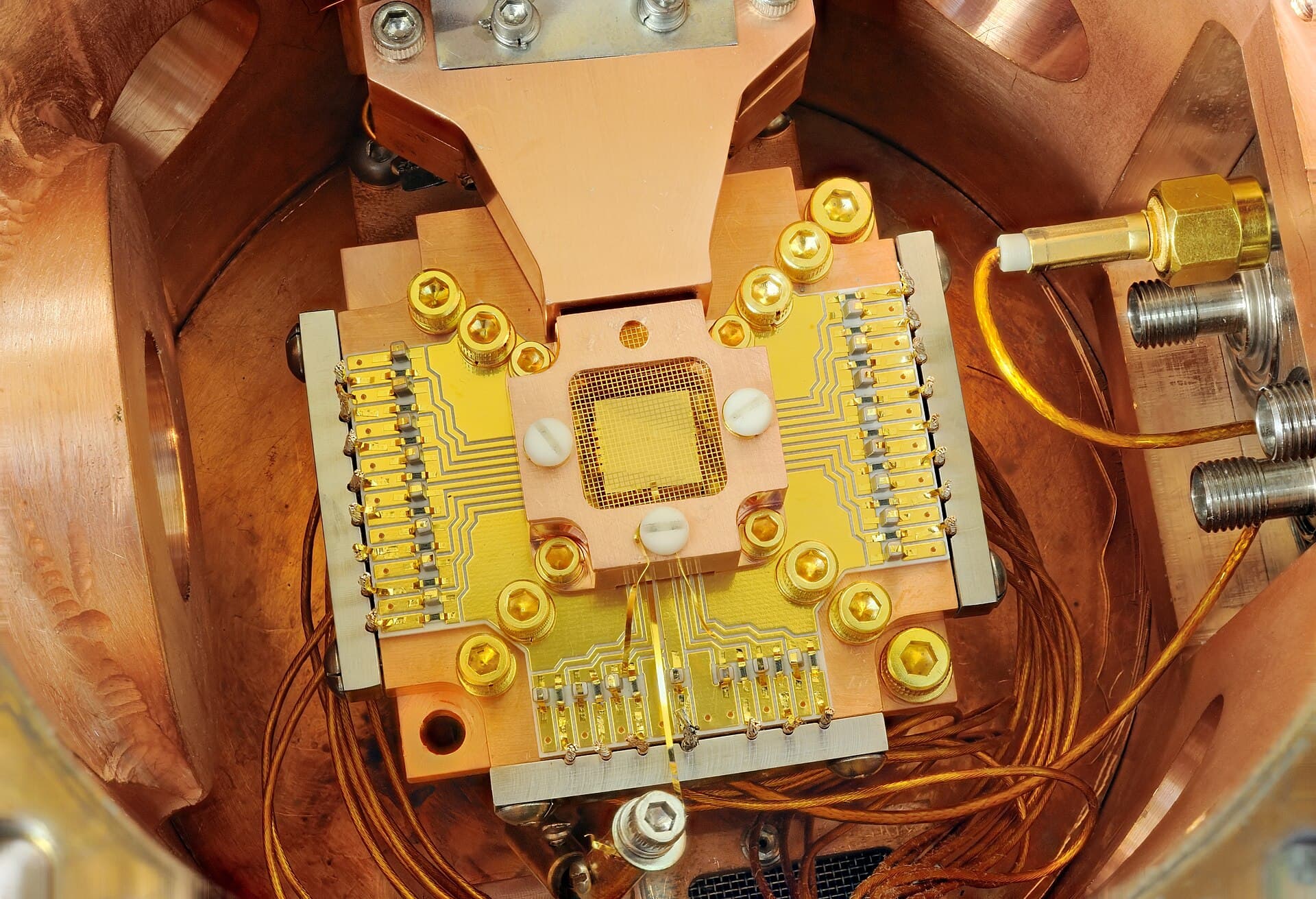
A trapped-ion processor at NIST. The circuits you write here target the same model of computation this machine runs.
Image: NIST, public domain.
Simple, honest pricing
Track 1 is free forever. Go Pro for the complete quantum curriculum.
Lifetime access at $97. Competitors charge $199+.
| Plan | Price | Billed | What it unlocks | Sign up |
|---|---|---|---|---|
| FreeNo card required. | $0 | Never |
| Get started free |
| MonthlyCancel anytime. | $12.99 | Monthly |
| Subscribe monthly |
| AnnualWorks out at $6.58 a month. | $79 | Yearly |
| Subscribe annually |
| LifetimeBest valuePay once, yours forever. | $97 | Once |
| Get lifetime access |
Common questions
Is myqubit free to use?
Yes. Track 1 (Quantum Foundations, 17 lessons) and the full Quantum Playground are free forever, with no credit card required. Pro unlocks all 10 tracks with 160+ lessons, unlimited AI hints, and advanced visualizations for $12.99/month, $79/year, or $97 lifetime.
Do I need to know quantum physics before starting?
No. Track 1 starts from zero and teaches qubits, superposition, and measurement through code. Basic Python helps, and the advanced math (linear algebra, complex numbers) is introduced gradually as you need it.
What programming language is used to learn quantum computing here?
Python, using Qiskit-compatible syntax. Qiskit is the industry-standard quantum SDK from IBM, so the code you write on myqubit transfers directly to real quantum hardware and research workflows.
Do I need to install anything?
No. Your code runs entirely in the browser via WebAssembly (Pyodide). Open the Playground, type Python, and your quantum circuit executes instantly with live Bloch sphere, state vector, and histogram visualizations.
How long does it take to learn quantum computing?
Most learners finish Track 1 fundamentals in a week of casual study. The full curriculum, from your first qubit to quantum algorithms like Grover and Shor, error correction, and quantum machine learning, takes around 40 hours of hands-on coding.
How is myqubit different from videos and textbooks?
You learn by writing real code, not watching. Every lesson is an interactive coding challenge with instant execution, live circuit visualizations, automatic checking, and a Socratic AI tutor that gives hints instead of answers.
New to the field? Start with our free guide: How to learn quantum computing
Ready to build quantum circuits?
No setup. No install. Start building in seconds.